Sunday, March 01, 2015

"Can You Guess Where The Screenshot Below Is From?", The Game Tips And More Blog's Game Screenshot Identification Contest, Starts Again Today! [2015-03 - Updated, End Of Contest]


It's somewhere within the first few days of a new month - and that means 
it's somewhere-around-approximately-something-kinda-like-the time for 
The Third Installment of The Game Tips And More Blog's New Contest: 
"Can You Guess Where The Screenshot Below Is From?"
(A Game Screenshot Identification Contest)
which starts again today - March 1st, 2015!


All you have to do to win, is contact me in any way you can (eg. Comment on this article below, Twitter profile tweet, email me at GameTipsAndMore@Gma il.com [removing the space]) within the next two weeks, with these three items within your message:
  1. Your guess for the game the image is from, as well as just one location it is used (area/map/level name or building name, etc)
  2. Any name/handle/alias you wish to be identified by (if different from your ID that you contacted me with) if you win
  3. Information on how to contact you back (to receive Steam game gifts, etc) if you win

That's it!

**[Just a quick note to be careful not to include any information you do not wish to share 'publicly' when posting in the Comments area below or sending a Twitter profile Tweet as these messages are seen by 'everyone']


Correct answers submitted for 14 days after the Contest starting time (beginning at the time of this posting) will be chosen from randomly, where one Skillful Identifier will receive this month's contest prize - which is carried over from last month: a gifted game from the Steam online store!

Winners will also be announced in bold, large lettered-text, here on this article and will thereby be immortalized on The Intertubes in perpetuity, proving to all other comers that they were The Ultimate Game Screenshot Sleuth!


Are you ready? Here then, is the Screenshot for this month, below:


[As you can see, the image is a portion of a full screen capture; but don't worry - the image used for the contest will never be too obscure or small (for example, it will never be 'just the end of a wooden log' or anything like that)]


...


Since it has been 7 days without a winner, here is an additional Hint!
Take a look at this image below:
Hint: Here is a larger portion of this month's screenshot and how
things look in-game, unedited (other than 'cut out' from the surrounding environs)...
Click to see Full Size

...


It has been two weeks since the Contest began and there have been no correct submissions! Aww....


To end The Mystery, here is the answer for this month's edition of
'Can You Guess Where The Screenshot Below Is From' (2015-03):
The Answer for this month's contest could have been: "Counter Strike Global Offensive" or "CSGO" for the game, and a listed place/source could have been "the Safehouse level/map" (with possibly the addition of "interior, upstairs, bedroom" as terms, but that sort of thing is never required). Click to see Full Size


Come back next month friends, when you can have another chance to be a Digital Screenshot Sleuth in the fourth edition of 'Can You Guess Where The Screenshot Below Is From' - and a chance to win the Prize that will be carried over to next time: a gifted game from the Steam online store!


See You In The Games!


(The Game Tips And More Blog Contest Game #2015-03)

Wednesday, February 25, 2015

Battlefield 4: Double XP Boost Is Now ON [Notification]

Just a quick post to mention that I noticed Battlefield 4 currently has a Double XP Boost going on. Briefly, for those who aren't familiar with what that is (new players, etc); the 'Double XP Boost' means that whatever XP you gain in a round, it will be matched by that same amount, adding to your total XP gained, effectively doubling it!

Double XP Boost Example in the End Of Round Details (the boosted XP is the Folly-coloured second bar)
Click to see Full Size


I wasn't aware this had started at all, and so I wanted to make a quick post to notify anyone interested... It doesn't seem to be limited to only 'Wednesdays', as this Battlefield News posting suggests recent bonuses might be ( http://battlelog.battlefield.com/bf4/news/view/this-season-on-battlefield-4/ ), because I have seen it 'on' now for the last couple of days straight... It may possibly be related to the Tournament going on ( http://battlelog.battlefield.com/bf4/news/view/america-and-oceania-take-on-europe-in-the-2015-esl-tournaments/ ) garnering some interest in BF4 for the moment; but whatever the reason, it's a great excuse to 'finish ranking up' towards that weapon you were working on Unlocking, or just jumping-in to grab some extra eXPerience and relax to the sight of people sliding along the ground or flying through the air from your bullets, bouncing around like some ballet of bulletry.

Whatever your reason to play, jump back in to Battlefield 4 for a moment - and See You In The Game!


Update 1: Just after I created this post, I now see a notification in Battlelog that there is a "2XP Frenzy Event" going on (All Platforms). Although the text in Battlelog forwards you to a Premium page, it appears to be useable even for Non-Premium Players. Thanks, EA!

Saturday, February 14, 2015

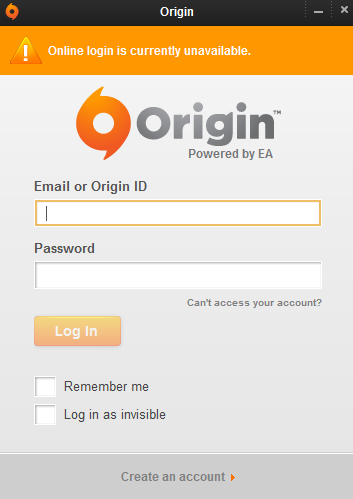
Origin - In Offline Mode, Online Login Is Currently Unavailable (It's Not Just You)


Update (11:11 UTC/Zulu): EA is investigating the issue(s) - way to go EA!
Update (11:34 UTC/Zulu): Everything Is Coming Up Roses here now (in Canada, eh). I hope it does soon for you too, my friends.


Just a quick post to let you know, if you are experiencing this around 10:00-11:00 hours UTC/Zulu Time on February 14th, 2015 - it's not just you. Origin (EA) seems to be having problems for everybody... I guess I won't be seeing you in the game right now /sadface


Friday, February 13, 2015

Diablo 3 Season 2 and Dream Of Mirror Online - Both Start Today! [Reminder]


Just a quick post as a reminder: Diablo 3 Season 2 and Dream Of Mirror Online both started today! 

Get in there and start levelling - no matter which game you are playing this weekend, have fun - and See You In The Games!


Sunday, February 08, 2015

Battlefield: Hardline Open Beta - EA Aware Of Issues, Some Servers Working Already [Notice]


Just a quick post for those playing the Battlefield: Hardline Open Beta this weekend, finding that things were going fine until just a bit ago, and now seeming like they can't join any servers and seeing errors like the one below, noticing that the website (Battlelog) isn't working right, their Stats are gone (Rank Zero), etc...


This is just a little notice that EA is aware of the issue and is working on it. You should find that servers are already coming back up now and things are straightening out already (way to go, EA!). Open Beta has been Extended until sometime Monday night (Feb.9th). Woot!

See You In The Game!

Friday, February 06, 2015

Dream Of Mirror Online - Closed Beta Key Code Giveaway

You asked for it, you got it - thanks to Suba Games and Wicked Interactive - DOMO is back!


Here at The Game Tips And More Blog, we are giving away 1,000 Closed Beta Key Codes, to help celebrate the return of Dream Of Mirror Online.

For this special occasion, we are not just going to give you ONE key, we are going to give you FOUR key codes, so that you can share them with your closest friends - and bring them with you into the return of this anime-themed social MMORPG when its Closed Beta begins on February 13th.


Once the Beta begins, prepare to enjoy these Features of Dream Of Mirror Online:
Just some of the many features to be found in DoMO.
(Click to see Full Size)


To get a 4-Pack of Closed Beta Keys, just send me an email at GameTipsAndMore@Gma il.com (removing the space) and put "DOMO" somewhere in the Subject Line. Some example subject lines are:

  • "I want to play DOMO!"
  • "I LOVE DOMO"
  • "Please give me my keys so that I can play with my friends in DOMO once again"

Then, I'll send you your 4-Pack of Key Codes, which you and your friends can use to Register, via the Header at the top of this article (click on the image at the top of this post, where it says 'Join Now!').

That's it!


The Official Dream Of Mirror Online 'Teaser' Trailer
from Suba Games (October 2014)


Get ready to relive the magic of DOMO - or experience it for the first time - and See You In The Game!


Monday, February 02, 2015

"Can You Guess Where The Screenshot Below Is From?", The Game Tips And More Blog's Game Screenshot Identification Contest, Starts Again Today! [2015-02 - Updated, End Of Contest]


It's somewhere within the first few days of a new month - and that means 
it's somewhere-around-approximately-something-kinda-like-the time for 
The Second Installment of The Game Tips And More Blog's New Contest: 
"Can You Guess Where The Screenshot Below Is From?"
(A Game Screenshot Identification Contest)
which starts again today - February 2nd, 2015!


All you have to do to win, is contact me in any way you can (Comment on this article below, Twitter profile tweet, email me at GameTipsAndMore@Gma il.com [removing the space]) within the next ten days, with these three items within your message:
  1. Your guess for the game the image is from, as well as just one location it is used (area/map/level name or building name, etc)
  2. Any name/handle/alias you wish to be identified by (if different from your ID that you contacted me with) if you win
  3. Information on how to contact you back (to receive Steam game gifts, etc) if you win

That's it!

**[Just a quick note to be careful not to include any information you do not wish to share 'publicly' when posting in the Comments area below or sending a Twitter profile Tweet as these messages are seen by 'everyone']


Correct answers submitted for 10 days after the Contest starting time (beginning at the time of this posting) will be chosen from randomly, where one Skillful Identifier will receive this month's contest prize - which is carried over from last month: a gifted game from the Steam online store!

Winners will also be announced in bold, large lettered-text, here on this article and will thereby be immortalized on The Intertubes in perpetuity, proving to all other comers that they were The Ultimate Game Screenshot Sleuth!


Are you ready? Here then, is the Screenshot for this month, below:
[As you can see, the image is a portion of a full screen capture; but don't worry - the image used for the contests will never be too obscure or small (for example, it will never be 'the end of a wooden log' or anything like that)]


»»  Since it has been 7 days without a correct submission yet, here is a helpful Hint!


Take a look at this image below:


Larger portion of screenshot for this month's identification contest
(Click to see Full Size)

Hint: This is how the image looks in-game, unedited (other than 'cut out' from the surrounding environs)... 


NOTA BENE: THIS CONTEST HAS BEEN EXTENDED UNTIL THE 22nd! 
The Theme Hospital Professor has chosen to Extend this month's contest, to allow for more time to identify the game and location of where the image above is from - get out there and see if you can find out where it is - and Good Luck!


It has been 20 days since the Contest began and there have been no correct submissions! Aww....


To end The Mystery, here is the answer for this month's edition of
'Can You Guess Where The Screenshot Below Is From' (2015-02):

The Answer for this month's contest would have been, "Archage" for the game, and a listed place of usage (the item being focused on) could have been "Walls of Memoria" (with possibly the addition of "view from Gweonid Lake", but that sort of thing is never required). Click to see Full Size


Come back next month friends, when you can have another chance to be a Digital Screenshot Sleuth in the third edition of 'Can You Guess Where The Screenshot Below Is From' - and a chance to win the Prize that will be carried over to next time: a gifted game from the Steam online store!


See You In The Games!


(The Game Tips And More Blog Contest Game #2015-02)

Friday, January 09, 2015

Over 2,000 DOS Games Playable For Free At The Internet Archive (First Impressions, some Screenshots and Controls)


Update: Audio has been improved for many games, kudos go out to the Curators at The Archive
Update: Added a few Helpful Controls for the emulation, at the bottom of the article


For those who don't know, there are now over 2,000 DOS-era games that are playable directly in your browser at The Internet Archive, here:


I have been testing out these MS-DOS games for the past while and want to share with you all what I have experienced so far...


Only a smattering of the huge library of games available to play at the archive


Looking at the huge list of games from my past, a tear almost came to my eye, thanks to Jason Scott, curator of the collection at The Internet Archive. He has uploaded close to 2400 games at the time of this post, to the collection at the first link above. Smiling at the possibility of him making a 2400-baud Modem 'inside joke' (even if he didn't mean to), I quickly found some childhood favourites to try.


The 'DOSbox' Loading Screen at the Archive for the browser-based interface to the games


The games appear to run in a DOSbox emulator, running within a Java-based Engine in your browser. Unfortunately, there seems to be some problems with how the games are running [at the time of this writing]. For me, trying over a dozen of these classic games, all of them had sound that was 'garbled', or 'glitchy', with 'echo-ey' clicks and pops, which weren't supposed to be present [weren't present in the originals].


Title Screen captured from one of the Classic DOS Games playable at the Archive (Wolfenstein 3D)
Click to see 'Full Size'


Although the games looked fine, I started troubleshooting what might be happening with the audio... At first, I tried different browsers. Originally playing them in Google's Chrome, I tried Mozilla's Firefox as well, and then Microsoft's Internet Explorer. In all three browsers, the problem with the audio remained, for me. So, I moved to other troubleshooting steps, changing my audio adapter from the built-in ('on-board') motherboard audio to a more dedicated device (I had a USB Sound Adapter from my Creative Labs Tactic 3D headphones, which I wasn't using at the time, so I plugged that in for a quick test). The problem with the 'static-y'/'glitchy' sound remained. Slash-sigh.


Gameplay screenshot captured from one of the Classic DOS Games playable at the Archive (Prince of Persia)
Click to see 'Full Size'


Just to test if it was some configuration problem perhaps (after updating Java and other drivers), I tried accessing the site from an older XP machine I have. The sound in games still had 'pops' and 'clicks' [at the archive site]... I lastly tried a couple of games on a friend's PC (which was running Windows 7 64-bit, as my system was) and still experienced the sound problem. All of these games from my childhood - and I can't get any of the sound working properly for them, no matter what I do? But I'm sooo close to gaming nirvana! I felt like I finally arrived at Wally World after travelling across-country all this time, only to get a recorded message of Harold Ramis, delivered from Marty Moose, telling me that the amusement park is closed for two weeks for cleaning and repairs... /ShakesFistAtTheSky


Title Screen captured from one of the Classic DOS Games playable at the Archive (Total Carnage)
Click to see 'Full Size'


But, all is not lost... Surely there are other people enjoying the games as they are - as I didn't find many people talking online about having sound issue(s) in a rudimentary search online. Just to make sure my machine wasn't completely becoming a sufferer of Dosphobia (an illness I just made up), I tried some DOSbox-run games that I purchased from Good Old Games [now GOG.com]. Thankfully, Theme Hospital ran flawlessly (when run locally)!


GREEETEENGZ  WAHLAWD
Welcome Screen captured from one of the Classic DOS Games playable at the Archive (Warlords 2)
Click to see 'Full Size'


So, my dear friends, a veritable treasure trove of games exists at The Archive now, and is awaiting to be experienced. Hopefully, you are one of those whom are having no problems at all - and if you are having audio issues as I am ...well just play without sound for now. How? In the upper-right corner of the page, you should see two small text buttons that say "Exit Beta" and "Feedback". Clicking "Exit Beta" will take you to the 'Version One' of the game collection's [Archive] interface. When clicking on a game to play, there should now be a "Mute" button below the area where the game runs. Although the game will run without audio, they still appear to run fine visually [I had no problems on my older dual-core XP machine, running the games themselves, even though the sound problem still existed].

The upper-right corner buttons to use if you are having issues with audio (as I was) or if you are experiencing the mouse not being aligned properly (the mouse being far away from what is shown on the screen). To fix that problem, see the below Tip


If you are having issues with your mouse not lining up properly (not being 'where it should be' on the screen), try disabling the newer Beta interface/page by clicking on the "Exit Beta" button in the upper right corner. You will get a page that should now have buttons below the area where the game runs. Clicking the "Fullscreen" button should allow the game to 'take over your mouse' and align it within the in-game cursor more properly.


Gameplay screenshot captured from one of the Classic DOS Games playable at the Archive (Dune 2, The Building of a Dynasty)
Click to see 'Full Size'


Since the collection is still in Beta, it is understandable that some problems are present and hopefully these glitches will be fixed in the future - for those that experience them, like me. For now, it is still a fantastic effort by Mr.Scott to make all of these Classic games available at The Internet Archive website. Check them out - and enjoy reliving (or experiencing for the first time) a 'Golden Age' in gaming.


Menu Screen captured from one of the Classic DOS Games playable at the Archive (Eye of the Beholder 2, The Legend of Darkmoon)
Click to see 'Full Size'


By the way, because the games are being presented in DOSbox (an MS-DOS environment emulator), this also means that DOSbox keys should work within the Stream interaction as well. I haven't tested all of them, but here are some that may be helpful [and I know these work for sure with the Streaming Archive as I have used them myself]:

CTRL+F10 - Release the mouse (if the game has 'captured' it) and also get the game to 'recapture' it
CTRL+F12 - Increase the cycles the game uses [of the server, since that's where it's running].
CTRL+F11 - Decrease the cycles the game uses.
Cycles are how many Instructions that DOSbox will try to emulate each Millisecond. When running DOSbox locally (on your own system), a window in the background will usually display the Cycles setting the game is on, but as this is an online ("remote", client/server) version, that window isn't seen. If a game is seeming sluggish/slow/laggy/etc however, you can still try increasing the Cycles; but be aware that if it goes too high, it can make the game skip/chug and seem laggy as well. It's sort of a balance you'll have to find [I try to increase it if a game is running a little slow, but if the sound starts to cut out or skip, then I pull it back down a bit, and this seems to give a good emulation speed - this is the same process I use when playing purchased DOSbox games locally, on my system].
For ALL the controls available for the DOSbox Emulator, see this page at the Wiki for DOSbox:
(Note: I have not tested all of these over the Streaming playable games from The Archive, some of them may not work the same way [when used through the streaming interface as opposed to using them when running DOSbox locally])


Enjoy and See You In The Games!

[Update: During the period of testing and writing this article, some changes have been made at The Internet Archive's MS-DOS Games Collection. It seems that some games are now automatically 'Muted' (the audio is turned off). They can be 'Unmuted' via a button, but this is encouraging evidence that the curator et al. are listening and responding to Feedback that has been submitted at the site. To quote a new piece of text that now appears at the collection's page: "Thank you for your feedback - we will continue to upgrade/bugfix the emulator going forward". Fantastic, in my opinion] 

[Update 2015-01-17: Going back and testing many of the games that I had first encountered in this article, the audio has been improved (less clicking, stuttering) in all of them so far -  kudos to the Curators at The Archive!]


Monday, January 05, 2015

"Can You Guess Where The Screenshot Below Is From?", The Game Tips And More Blog's Game Screenshot Identification Contest, Begins Today! [2015-01 - Updated, End of Contest]


[Update: Since it has been 7 days without a correct submission yet, a Hint has been added! (See '»»' ) ]
[Update: Sorry, No Winner this month! The Answer for this month's Screenshot is below
and the Prize will be carried over to next month's contest!]


The Very First Installment of The Game Tips And More Blog's New Contest, "Can You Guess Where The Screenshot Below Is From?" (A Game Screenshot Identification Contest), Begins Today - January 5th, 2015!


All you have to do to win, is contact me in any way you can (Comment on this article below, Twitter profile tweet, Email, etc) within the next ten days, with these three items within your message:
  1. Your guess for the game the image is from, as well as just one location it is used (area/map/level name or building name, etc)
  2. Any name/handle/alias you wish to be identified by (if different from your ID that you contacted me with) if you win
  3. Information on how to contact you back (to receive Steam game gifts, etc) if you win

That's it!

**[Just a quick note to be careful not to include any information you do not wish to share 'publicly' when posting in the Comments area below, Twitter profile Tweet, etc. as these messages are seen by 'everyone']


Correct answers submitted for 10 days after the Contest starting time (beginning at the time of this posting) will be chosen from randomly, where one skillful identifier will receive this month's contest prize: a gifted game from the Steam online store!

Winners will also be announced in bold, large lettered-text, here on this article and will thereby be immortalized on The Intertubes in perpetuity, proving to all other comers that they were The Ultimate Game Screenshot Sleuth!


Are you ready? Here is the Screenshot for this month, below:

[As you can see, the image is a portion of a full screen capture; but don't worry - the image used for the contests will never be too obscure or small (for example, it will never be 'the end of a wooden log' or anything like that)]


»»  Since it has been 7 days without a correct submission yet, here is a helpful Hint!


Take a look at this image below:


Hint: This is how the image looks in-game, unedited (other than 'cut out' from the surrounding environs)... The image was initially 'corrected' to display the "person" in the picture at the correct perspective (how a person would be depicted straight-on, as in a painting [for example]). I felt that leaving it at this original angle [of how it exists in the game exactly] would possibly give the answer away too easily perhaps [for some].


[Note: Please do not feel deceived by the above, dear reader, as that was not my intention. I merely meant to display it "how it would look in real life"; much like correcting the angle of a clock on a wall or a painting, straightening it - I did not mean to seem overly deceptive - I want everyone to win! I simply thought that showing it 'at the exact angle it appears in the game' may have given the answer away too quickly, in this case/game. If you feel 'duped' in this one instance, please accept my sincere apologies.]


It has been 10 days since the Contest began and there have been no correct submissions! Aww....


To end The Mystery, here is the answer for this month's edition of
'Can You Guess Where The Screenshot Below Is From' (2015-01):

The Answer for this month's contest would have been, "Diablo 3" for the game,
and a listed place of usage could have been "Cathedral Level 3".
Click to see Full Size


Come back next month friends, when you can have another chance to be a Digital Screenshot Sleuth in the second edition of 'Can You Guess Where The Screenshot Below Is From' - and a chance to win the Prize that will be carried over to next time: a gifted game from the Steam online store!


See You Next Month - and See You In The Games!


(The Game Tips And More Blog Contest Game #2015-01)

Thursday, December 25, 2014

Merry Christmas and Happy New Year as We Go Together into 2015


To all my dear readers in this holiday season,

I know that at this time of year, I usually like to share Deals And Sales going on and talk about (or make tutorials for) the Winter/Holiday Events going on in games right now, to help others out... But I must apologize - I have been 'down a notch' the past while and have not felt up to making some posts lately.

I am sorry my friends, but I should 'pick up' in the coming weeks and soon be able to get back to Tips, Tutorials, Screenshots And of course, More. I have seen your requests for Game Recording articles and Gameplay Video Editing Tips. I do like to listen to you all and I have already begun a few 'projects' in response to your requests - some posts that are In Progress about these topics over the previous months... but it seems I will not be able to complete them until 2015 ['next year', heh].

I would like to take a moment to say Thank You, to all of you, for all of your readership and kind words, for stopping by and letting me know that my Tips have helped you out somehow, for being interested in learning new things about games, game recording and video editing; and for filling my head with ideas that I can work on for others. I will return, don't worry. The illness I have, has periods of 'waxing' and 'waning' and sometimes I am more physically 'down' than I am 'up' - and this is one of those times, unfortunately.

However, rest assured that I will be catching up on some rest over the holidays, trying to recover and eventually getting back to video editing, making graphics and typing out Tips (And More) for you all to read, where hopefully there will be Tips or Tutorials that will have things 'new to you' in the upcoming year, that you may find helpful.

For now, I want to personally wish you the very best of this time of year, no matter what holiday you are celebrating, no matter how many games you may be playing (or wishing for)... Merry Christmas to you.

Sincerely,
Troy from The Game Tips And More Blog


See You In The Games Next Year, Friends!

Sunday, December 07, 2014

And More, Quick Tip: HitFilm Effects 'Stop Working' or 'Not Working When Reopening Projects' in Sony Vegas 13

Just a Quick Tip, for those using Sony's Vegas line of products for editing. I was working in a recently-upgraded-to Movie Studio 13 Platinum, enjoying the new version and trying the FXHOME HitFilm Effects plug-ins that come with it. Then, the plug-in effects seemed to stop working today - they didn't show the effects in the Preview at all when I re-opened the Project. I could open the Settings Panel for the plug-ins and change them, but could not 'see' the HitFilm effects. I made a few recent changes to my System, one of them being upgrading my NVIDIA GPU drivers. So, I rolled them back, installing an older version (going back to 332.21 - a version I chose so that I could also use CUDA for Rendering, among other things) and boom - the Hitfilm effects were back ...to the future ...with a vengeance ok I'll stop. So, if anyone else runs into this problem with these HitFilm Effects and Vegas [it may help no matter what Edition you have installed], try rolling back the GPU drivers.


[N.B.: This issue was encountered and solved on my NVIDIA GPU,
it is unknown by myself, at this time, whether this issue exists with AMD/ATi GPUs]

Have fun editing your gameplay adventures - and See You In The Games!


Saturday, November 01, 2014

Trove - Early Access Closed Beta Key Code Giveaway (With Unlimited Uses!)


For those who missed the recent Open Beta Test Weekend for Trove, here is an Unlimited Use Closed Beta Key Code for Early Access!


I am currently working on a 'First Impressions' article, as well as a 'First Tips And Helpful Hints' post, to put up here at the blog - but you don't have to wait for those to arrive - you can take this code right now and Apply it to your account at the Trion Worlds website (and share it with your closest friends) to start testing out the game that many people are already beginning to call "their current favourite"..and now you can find out why... So get the code, get in there, by yourself or with some friends - and See You In The Game!

Thursday, October 23, 2014

Bandicam - Their 2.1.0 Release and Testing Compatibility of the MP4 Container Recordings with Nine Different Video Editing Programs [Link To Forum Post]


Just letting those who use Bandicam to record their gameplay know, I tested the newest version (2.1.0.708, released two days ago) and Bandicam's new ability to record into an MP4 container [natively], an addition that would hopefully increase compatibility with video editing programs. All I did was some quick tests by importing recordings created by Bandicam into different video editing applications; but I wanted to share the results with you all. Here are the programs I tested:

- Adobe Premiere Pro 6 (Trial)
- Avid Media Composer 8.1 (Trial)
- Sony's Vegas Movie Studio 11 Platinum
- CyberLink's PowerDirector 12
- Lightworks 12
- Nero Video 11
and some free video editing applications...

For the results of my testing the new MP4 container recording option with those video editors, visit my short post at the Official Bandicam Forum here:
http://www.bandisoft.com/forum/viewtopic.php?f=10&t=2956&p=10235

I hope you find it useful and See You In The Games!

Tuesday, September 16, 2014

Quick Tip: Archeage Stuck On "Applying"... [FIX]


Happy Launch Day To All Archeageans! [I'm not sure what they would be called... I'm just going to use that word I made up just now, and hope it doesn't offend any of them] Just a Quick Tip to all players of Archeage, especially those of you trying to install or patch the game through Trion's Launcher application and finding it stuck on "Applying..." and your hard drive going crazy, for literally hours on end if allowed to, with no seeming progress - here's one thing that could be causing this:


Applying... Forever


Long Version


While updating Archeage through Trion's game launcher, Glyph, my computer seemed to be almost 'locked up', just sitting there, the progress bar not moving at all. All it said was: "Applying.." and it didn't seem to be making any progress - but my hard drive light was almost solid, it was so darn busy... So, I did a little poking around, and here are some things I found:

Microsoft's Resource Monitor, showing that the CPU usage of Microsoft's Security Essentials executable (MsMpEnd.exe) is not using up much CPU (top set of two green arrows); but it is using up most of the throughput of the hard drive (bottom set of two green arrows). Click to see Full Size

Opening the built-into-Windows Resource Monitor, to see what could be keeping Windows so busy, I saw that the executable MSMPENG.EXE was going crazy. It wasn't hogging the CPU in usage, it was constantly accessing the hard drive, but the drive didn't seem to have problems (the response time was ok, etc) - so that indicates that it probably wasn't the hard drive's fault. Since MsMpEng.exe is part of the Windows Anti-Spyware/Anti-Virus utilities (Windows Defender/Microsoft Security Essentials/etc) I wondered if it was scanning some huge patch/update file that the game was trying to use. 


Windows Explorer, showing the large temporary files that Glyph/Archeage is creating, which seem to be causing problems with Microsoft's Security Essentials. Click to see Full Size

A quick trip to the Temporary Folder of Windows later... and there it was: a few large files, one of them 15GB alone. Well, no wonder everything seems like it is locking up solid. I made the choice to trust Trion, that they weren't doing anything untoward on my system, that they were merely trying to patch their game, and I temporarily disabled Microsoft Security Essentials, which I had installed on my computer. 

Microsoft Security Essentials, showing where to go to Disable the Real-Time Protection (temporarily), so that the Archeage patching done in Trion's Glyph game launcher can continue and complete. Click to see Full Size

'Et Voila' ["And There It Is"]... everything was working again, the patch completes in mere seconds and the game started up... 


Short Version


Part of how the Trion's game launcher Glyph appears to be set up is, it will patch/update Archeage by creating huge temporary files, which at least one virus scanner (Microsoft Security Essentials) chews and chews on forever (scanning the large files slowly). This gives the appearance that 'nothing is happening'. Disabling your anti-virus [in my case, I was running MSE] temporarily, should allow the patch to continue and the game should start soon after...

In my mind, the button wasn't saying "OK" anymore.


While this fix [more of a workaround really, until Trion and/or Anti-Virus Software companies actually fix whatever is causing the problem] is somewhat of a security risk (disabling any security on your system always is), it does appear to solve the issue and allow the patching to continue and the game to run. As long as Trion isn't trying anything 'funny' - which I doubt they would, as it would negatively affect their publicity and possible future income - then disabling your own anti-virus protection, for this one purpose, should be ok [sorry Trion, 'it's not you ..it's me', I am just cautious towards telling others to disable any Security their systems may have]. In the end, I hope it works for you all, as it did for me.


Have fun playing Archeage and See You In The Game!