Showing posts with label can't. Show all posts

Tuesday, October 31, 2017

The Elder Scrolls Online - How To Logout Of Your Game Account, When Using The Steam Version Of TESO [Tutorial]


Recently, I was getting back into playing The Elder Scrolls Online a bit - which I haven't really played at all since the Beta Testing Phase of the game. I was also popping in to the Steam Forum for the game, helping out a few people and I ran into someone asking about 'how to logout of the game' - that is, how to Logout of their Account but not actually exit/quit the game itself. While this may seem easy with the Standalone/Web Version of TESO (you just click the "Back" link at the Character Selection screen, which takes you to the Login screen, with the Account information fields to fill in); with the Steam Version of TESO - when you have associated your Steam Account with TESO - this is not quite as easy, as hitting "Back" at the Character Selection merely takes you back to a screen that just says LOGIN, with no fields to fill in. An example of how this looks is just below:

Example of what the Login Screen looks like,
when a Steam Account is directly associated with a TESO Account
(Click to see Full Size)

So, I tried to figure out how to 'logout of the game' but not 'logout of Steam', as it were; being able to log out of TESO so that one could change to a different account if they wanted to (say, to let a family member login/play with their own account), but keep Steam and the game running, similar to what one could do when running the Standalone/Web version of the game...

Normally, this can be done with games that utilize Game Clients ("Launchers") by not starting up the Game Client, but instead going to the executable file for the game directly, running it to start the game up (which usually opens the game to a Login screen of some sort). In the case of the Steam Version of TESO, here are the steps I found to do this:

  • Open Steam
  • Right-Click on TESO in the Library and choose Properties
  • Click on the Local Files tab
  • Click on the Browse Local Files button to show the directory/folder of the game
  • Navigate into THE ELDER SCROLLS ONLINE > GAME > CLIENT folder
  • Double-Click on "eso64.exe" to launch the game (or "eso.exe" if running 32-bit Windows/Game)


That's it! Now you should be at the Login area that everyone with the Standalone/Web-sourced version of The Elder Scrolls Online sees: a screen with Data Fields that can be filled in with Account Information, to Login. An example of what it looks like, is below:

Example of what the Steam Version of TESO's Login Screen looks like,
when launched directly from the Executable file,
even though a Steam Account is associated with TESO
(Click to see Full Size)


I wanted to share this here, to help others that might run into this 'problem'; wanting to 'logout of their TESO game account' or 'change TESO game accounts', while using a Steam Version of the game. While associating your Steam Account with your Elder Scrolls Online Account is somewhat convenient (as you don't have to type in your login information every time you start the game), hopefully this will assist with the issue that does arise then, when one wants to just Logout of the game and/or Login with a different TESO Account.


I hope that helps - and See You In The Game!

Monday, July 03, 2017

Quick Tip: Fallout 4 - "Get Rid Of Someone You Don't Like" in Your Settlement (Without Killing Them or Using Cheats) [Suggestion, Text-Only Mode]

Just wanted to share something that came up, in answering a Question someone asked in the Official Steam Forum for Fallout 4 - in case anyone has a Settler in one of their bases that they really, really don't like...

A person asked in the Forum, how to 'get rid of' Jezebel', whom for those who do not know, is a Robo-Brain type automatron, from the Automatron Official DLC. Without getting into any Spoilers, I'll just say "she has an attitude"...

However, because she is a Resident of your Settlement, you cannot easily get rid of her, as attempting to just kill her will set all of the other Settlers gunning for your head in retaliation/defense.

Also, although she can be Assigned to the Task of, say running a Shop at the far end of Town and 'stay there', she is not of much use in that respect - because Robots cannot run Shops/Stores [sadly].

I thought of using her to start a Supply Line (so her Task/Job will take her out of town almost all of the time and you'll rarely ever have to see her) - and saw that another helpful Fallout 4 player thought of the same thing - and already posted it as a Reply in the Discussion...

Still, I could add (as a Tip perhaps); that you can 'send her away' even more so by first Moving her to a Settlement that you rarely go to (using the MOVE menu bar command, at the bottom of the Workshop Mode interface).

You could Move her to Oberon Station perhaps, or The Slog [those are where I normally send 'people I don't like' lol] - anywhere that you normally don't 'check up on' as much as you do your other Settlements...

Then, after that, Assign her to become a Provisioner and start up a Supply Line (using the SUPPLY LINE menu bar command, in Workshop Mode) between the starting place of where you sent her ("far away") and another place you rarely go to - that way, you will REALLY never have to see her again!

[Actually, you may still run into her, as you run into your Provisioners if you journey into the paths between the Settlements you have Supply Lines set up for - but still, if you pick two remote places that you don't really visit often as her Supply Line nodes (start and end points), then you'll really rarely ever bump into her]

Either way, I hope these ideas help any of you 'get rid of someone' you don't like, from a Settlement (and you don't want to kill them or use cheats/commands to do it). Have fun in Fallout 4!

Tuesday, August 02, 2016

It's Not Just You™ - Battle.Net Issues with Logging In Today [Notification]

Just a quick post to let others know that if you are having logging in to Battle.Net today (August 1st) that lots of people have been having problems as of this morning. Blizzard has addressed this with a quick note via their twitter, seen at:

https://twitter.com/BlizzardCS/status/760100687111938048

Retry or Go Back To Bed? Hmmm....

For those playing Blizzard/Battle.Net games this weekend, hopefully it will be up soon - just letting you know, It's Not Just You™ !


Saturday, June 18, 2016

It's Not Just You™ - Battle.Net Issues with Logging In and Updates The Past Few Days [Notification]


Just a quick post to let others know that I am having issues logging in to Battle.Net - well, I don't mean 'just me', sorry, I mean "me too" - as in, lots of people have been having problems the last few days, as seen in places like:

http://downdetector.com/status/battle-net/map/

and

https://twitter.com/BlizzardCS


The Battle.Net Launcher [agent.exe] just kept 'trying' to log in... forever.

Logging in... forever


Eventually it told me that I could only play Offline (error 3801 in my case). It also gave a link to the Battle.Net website for the error (a link is put in the Launcher after it can't connect) which directs you here:

https://us.battle.net/support/en/article/BLZBNTBGS80000011

This seems to be a 'generic' error of "we might be under maintenance but we don't really know"


Once I finally got logged in to the Launcher, it got stuck doing "updates"... Finally, after quite a while, it now seems to be able to function fully - I can open Hearthstone or World of Warcraft, for example - and play those now.

Just letting you know that if you are experiencing problems with Battle.Net, the Blizzard Launcher or their games over the weekend - It's Not Just You™... and once it gets working for you - See You In The Game!


Saturday, February 14, 2015

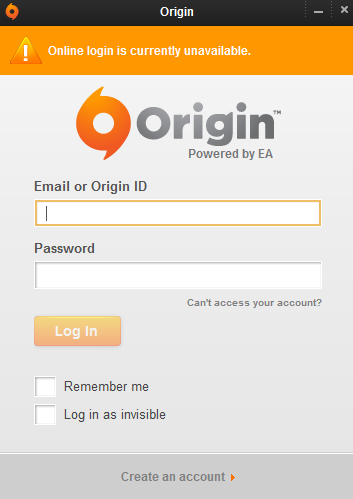
Origin - In Offline Mode, Online Login Is Currently Unavailable (It's Not Just You)


Update (11:11 UTC/Zulu): EA is investigating the issue(s) - way to go EA!
Update (11:34 UTC/Zulu): Everything Is Coming Up Roses here now (in Canada, eh). I hope it does soon for you too, my friends.


Just a quick post to let you know, if you are experiencing this around 10:00-11:00 hours UTC/Zulu Time on February 14th, 2015 - it's not just you. Origin (EA) seems to be having problems for everybody... I guess I won't be seeing you in the game right now /sadface


Sunday, February 08, 2015

Battlefield: Hardline Open Beta - EA Aware Of Issues, Some Servers Working Already [Notice]


Just a quick post for those playing the Battlefield: Hardline Open Beta this weekend, finding that things were going fine until just a bit ago, and now seeming like they can't join any servers and seeing errors like the one below, noticing that the website (Battlelog) isn't working right, their Stats are gone (Rank Zero), etc...


This is just a little notice that EA is aware of the issue and is working on it. You should find that servers are already coming back up now and things are straightening out already (way to go, EA!). Open Beta has been Extended until sometime Monday night (Feb.9th). Woot!

See You In The Game!

Saturday, August 23, 2014

It's A Busy Day For Battle.net! (Can't Login To Battlenet Authentication Application Launcher ...Thingy) [Workaround]


Estimated Queue Time: Almost 10 Hours. Hey, I could go to sleep! It's not such a bad thing after all


Just a quick post to let you know, if you are experiencing this right now, that you are not alone. Not by a long shot. Some even have a theory. Even though I am sure this issue will spark another set of debates in forums about 'Always Online Games Versus Offline Games', try not to fret "too much", as Blizzard knows about it and is hard at work on the Blizzard Servers as we speak.

Proof*:
[I can't stop laughing at the jacket ahaha it turned out great]


Hopefully they will fix it Soon™...


Meanwhile, this is a good time to empty out your bathroom bottles at your desk, take the dog for a walk or feed it, take a shower, do some laundry, and many more things that may have been neglected lately due to heavy gaming. In a way, whatever is the cause of this, it is doing us a 'helpful distraction' public service! Sort of. Don't worry, you'll be back Online and Gaming again in no time.

A couple of things you can try for now as Workarounds are: don't use the Battle.Net Launcher/App to Login to your game's account, use the .EXE file that launches the game directly. Then, when it opens up, simply log in there in the game's Main Menu. This seems to work fine.
You can also try going Offline in the Battle.Net Launcher and still be able to hit Play for the game you want to launch, then log in at the game's Main Menu [which is essentially the same as the first Workaround, but saves you the trouble of taking the time to go and locate and execute the game's startup file] - this second way of doing the above was found at the Battle.Net forums, shared by Telkari, here.
If neither of these work for you right now, I just got in to the Battle.Net Launcher, far under the estimated time of queue. Hopefully this will happen to you, too.


See You In The Games!


[UPDATE»»» I was playing D3 using my above method (the first one) to log in... but I tried switching to Hearthstone just now - and it did not work for it...]


*Image Disclaimer: The picture used above was created for parody/satire and is only presented for [very] slight comedic effect. No copyright infringement or defamatory inclination in any form was intended and cannot be inferred. I personally support Blizzard Entertainment Inc. financially as a customer and have done so for many years through my past game purchases/licenses and have been a loyal subscriber for many years intermittently for their always exceptional products and support. This image was merely an attempt at humor and no ill will was meant to Blizzard Entertainment, it's employees, affiliates or partners, in any degrees of association. The picture is not to be utilized as a substitute for medical attention.

Saturday, August 02, 2014

Quick Tip: Planetside 2 - Medic Revive Not Working [Note]

Just a quick tip for those who have recently jumped back into playing some frantic Planetside 2 and thought there was something wrong with the medic tool, being unable to revive, thinking they can't revive, etc - there was a patch a bit back that changed the Medic Tool so that Left-Click will Heal and Right-Click will Revive. Although changing such a long running/'staple' operation is a little lip-pursing, it should have the overall positive effect of assisting with attempting to revive within a tight group of teammates (instead of your tool randomly healing someone close, it should more effectively target the face down teammate on the ground). Just a note.


See You In The Games!

Saturday, June 01, 2013

Quick Tip: Can't Record Your Game At All? (64-bit/32-bit Fix)

Just a quick tip for when it seems like you cannot record your game 'at all':
64-bit computing is still relatively new for home users, which means that not all 64-bit hardware and applications communicate without problems. Many game recording apps simply can't record games that operate in 64-bit modes. Just look for a 32-bit version of your game/gameclient and then your game recording program (no matter which one you use, be it Dxtory, Bandicam, MSI Afterburner..) should be able to record the screen. [For games that use Java (eg. Minecraft), download the 32-bit Java at their website]

See you in the games!