Showing posts with label login. Show all posts

Tuesday, October 31, 2017

The Elder Scrolls Online - How To Logout Of Your Game Account, When Using The Steam Version Of TESO [Tutorial]


Recently, I was getting back into playing The Elder Scrolls Online a bit - which I haven't really played at all since the Beta Testing Phase of the game. I was also popping in to the Steam Forum for the game, helping out a few people and I ran into someone asking about 'how to logout of the game' - that is, how to Logout of their Account but not actually exit/quit the game itself. While this may seem easy with the Standalone/Web Version of TESO (you just click the "Back" link at the Character Selection screen, which takes you to the Login screen, with the Account information fields to fill in); with the Steam Version of TESO - when you have associated your Steam Account with TESO - this is not quite as easy, as hitting "Back" at the Character Selection merely takes you back to a screen that just says LOGIN, with no fields to fill in. An example of how this looks is just below:

Example of what the Login Screen looks like,
when a Steam Account is directly associated with a TESO Account
(Click to see Full Size)

So, I tried to figure out how to 'logout of the game' but not 'logout of Steam', as it were; being able to log out of TESO so that one could change to a different account if they wanted to (say, to let a family member login/play with their own account), but keep Steam and the game running, similar to what one could do when running the Standalone/Web version of the game...

Normally, this can be done with games that utilize Game Clients ("Launchers") by not starting up the Game Client, but instead going to the executable file for the game directly, running it to start the game up (which usually opens the game to a Login screen of some sort). In the case of the Steam Version of TESO, here are the steps I found to do this:

  • Open Steam
  • Right-Click on TESO in the Library and choose Properties
  • Click on the Local Files tab
  • Click on the Browse Local Files button to show the directory/folder of the game
  • Navigate into THE ELDER SCROLLS ONLINE > GAME > CLIENT folder
  • Double-Click on "eso64.exe" to launch the game (or "eso.exe" if running 32-bit Windows/Game)


That's it! Now you should be at the Login area that everyone with the Standalone/Web-sourced version of The Elder Scrolls Online sees: a screen with Data Fields that can be filled in with Account Information, to Login. An example of what it looks like, is below:

Example of what the Steam Version of TESO's Login Screen looks like,
when launched directly from the Executable file,
even though a Steam Account is associated with TESO
(Click to see Full Size)


I wanted to share this here, to help others that might run into this 'problem'; wanting to 'logout of their TESO game account' or 'change TESO game accounts', while using a Steam Version of the game. While associating your Steam Account with your Elder Scrolls Online Account is somewhat convenient (as you don't have to type in your login information every time you start the game), hopefully this will assist with the issue that does arise then, when one wants to just Logout of the game and/or Login with a different TESO Account.


I hope that helps - and See You In The Game!

Saturday, February 14, 2015

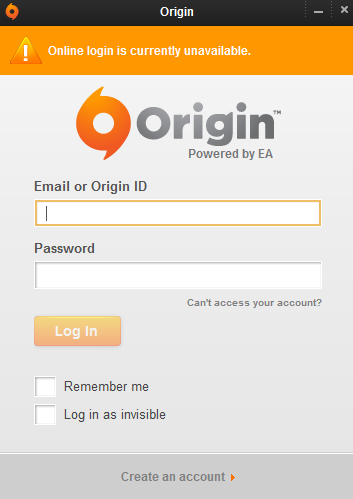
Origin - In Offline Mode, Online Login Is Currently Unavailable (It's Not Just You)


Update (11:11 UTC/Zulu): EA is investigating the issue(s) - way to go EA!
Update (11:34 UTC/Zulu): Everything Is Coming Up Roses here now (in Canada, eh). I hope it does soon for you too, my friends.


Just a quick post to let you know, if you are experiencing this around 10:00-11:00 hours UTC/Zulu Time on February 14th, 2015 - it's not just you. Origin (EA) seems to be having problems for everybody... I guess I won't be seeing you in the game right now /sadface


Saturday, August 23, 2014

It's A Busy Day For Battle.net! (Can't Login To Battlenet Authentication Application Launcher ...Thingy) [Workaround]


Estimated Queue Time: Almost 10 Hours. Hey, I could go to sleep! It's not such a bad thing after all


Just a quick post to let you know, if you are experiencing this right now, that you are not alone. Not by a long shot. Some even have a theory. Even though I am sure this issue will spark another set of debates in forums about 'Always Online Games Versus Offline Games', try not to fret "too much", as Blizzard knows about it and is hard at work on the Blizzard Servers as we speak.

Proof*:
[I can't stop laughing at the jacket ahaha it turned out great]


Hopefully they will fix it Soon™...


Meanwhile, this is a good time to empty out your bathroom bottles at your desk, take the dog for a walk or feed it, take a shower, do some laundry, and many more things that may have been neglected lately due to heavy gaming. In a way, whatever is the cause of this, it is doing us a 'helpful distraction' public service! Sort of. Don't worry, you'll be back Online and Gaming again in no time.

A couple of things you can try for now as Workarounds are: don't use the Battle.Net Launcher/App to Login to your game's account, use the .EXE file that launches the game directly. Then, when it opens up, simply log in there in the game's Main Menu. This seems to work fine.
You can also try going Offline in the Battle.Net Launcher and still be able to hit Play for the game you want to launch, then log in at the game's Main Menu [which is essentially the same as the first Workaround, but saves you the trouble of taking the time to go and locate and execute the game's startup file] - this second way of doing the above was found at the Battle.Net forums, shared by Telkari, here.
If neither of these work for you right now, I just got in to the Battle.Net Launcher, far under the estimated time of queue. Hopefully this will happen to you, too.


See You In The Games!


[UPDATE»»» I was playing D3 using my above method (the first one) to log in... but I tried switching to Hearthstone just now - and it did not work for it...]


*Image Disclaimer: The picture used above was created for parody/satire and is only presented for [very] slight comedic effect. No copyright infringement or defamatory inclination in any form was intended and cannot be inferred. I personally support Blizzard Entertainment Inc. financially as a customer and have done so for many years through my past game purchases/licenses and have been a loyal subscriber for many years intermittently for their always exceptional products and support. This image was merely an attempt at humor and no ill will was meant to Blizzard Entertainment, it's employees, affiliates or partners, in any degrees of association. The picture is not to be utilized as a substitute for medical attention.