I just wanted to take a moment to say, no matter what you are celebrating at this time of year (or not), no matter what games you are playing (or not), no matter what you believe or who you are (or aren't), I want to wish you, my dear reader, a heartfelt Merry Christmas and All The Best in the New Year.
To celebrate at this time, I am going to share a Desktop Wallpaper I threw together last year [due to ongoing illness, not having much energy at the moment to create a new one, sorry]. It was captured in Planet Coaster, after taking some time to festively decorate King Coaster's 'Festive Funlands' Park (Gingerbread Night Scene with added Lights, Decorations and Greetings). Take care all - and See You In The New Year!
Sincerely,
Troy from The Game Tips And More Blog
~ P.S. Don't forget to check out some Game Sales going on all over (Steam, Origin, Good Old Games (GOG), HumbleBundle, and more - even local stores/retailers - gaming is a great little break from any stresses at this time of year)! Have fun out there!
[Windows Related] Although not really anything 'new' - this is something I have been experiencing off and on in Windows for years now - I wanted to mention something here (just in case it might help others too) that today is, for some strange reason, the first time I am submitting Windows Feedback on an aging issue: where the Desktop Icon images sometimes (for unknown reasons) load as wee-little versions of themselves - intermittently showing smaller images of the 'normally-256x256-or-higher' resolution images - and if you are experiencing this too, It's Not Just You™...
For the last few versions of Windows, I have been seeing, at random times, Desktop Icons loading - not their nice, large representations of their games, both alluring and alluding to the fun to be had in the games 'behind-the-mask' - but loading wee-little teeny-tiny versions of themselves, squishing the pixels in merciless transgression, giving my normally-full-of-icons Desktop scattered pimples of picturesque perturbation. One example of one of these perpetrators, is below:
As you can see, the [lower] Warhammer 40k Icon I created/assigned, has loaded 'full size' (Windows Large Preset Size), whereas the Vindictus Icon [on top] has loaded a 'smaller size' of its' normally larger self today - for no stated reason at all. No message, no little exclamation mark on the corner of the image, to indicate "something went wrong", leading me to troubleshoot what might be the issue. Indeed, I can do nothing, but try to ignore my pimple-popping urge to fix these intermittent occurrences to my Desktop (temporarily, by replacing the Icon image with something else - the only repeatable 'workaround' I have come across so far).
And so, after many years of finger-in-the-dam work on bypassing this little problem [pun not intended], I have finally mentioned it to Microsoft, via their Official Windows Feedback Hub, found in Windows 10...
The Official Windows Feedback Hub personally thanking me for submitting my feedback about icons loading smaller sizes of themselves, randomly, for no reason whatsoever other than to make me notice that game that I haven't played in years but still have installed, taking up space on my drives, which is already at a premium due to my screenshot and clip hoarding tendencies
As many of you already know, MS has been trying very hard to really listen to Users these last few generations of Windows, implementing Suggestions and continually collecting Feedback on a myriad of topics that have to do with Windows, from how it operates, to how it simply looks. Today, I finally got around to telling them about this little virtual thorn of mine. Perhaps someday, they will find out why this happens randomly [to different icons each time!] and I may one day feel relief in my virtual lion's paw... Good Luck, Microsoft - I think you'll need it; and if you, dear reader, are experiencing this too, remember - It's Not Just You™...
Addendum: Just a quick note that I have been creating/editing my own Windows Desktop Shortcut Icons for some time now, from multi-layered compositions (with added sun flare!) to simple crops from game boxes or ads (like the one shown above, for Warhammer) - someday, I plan on sharing these Icons with you, my dear readers, here at The Blog. I have no idea when, but it's safe to say that I will be able to collect them up, polish them down and pack them in a Zipped-up File and share them sometime around 2025... Soon™
I just wanted to take a moment to say, no matter what you are celebrating at this time of year (or not), no matter what games you are playing (or not), no matter what you believe or who you are (or aren't), I want to wish you, my dear reader, a heartfelt Merry Christmas and All The Best in the New Year.
To celebrate at this time, I want to share a Desktop Wallpaper I threw together, captured in Planet Coaster, after taking some time to festively decorate King Coaster's 'Festive Funlands' Park (Gingerbread Night Scene with added Lights, Decorations and Greetings). Take care all - and See You In The New Year!
Sincerely,
Troy from The Game Tips And More Blog
~ P.S. Don't forget to check out some Game Sales going on all over (Steam, Origin, Good Old Games (GOG), HumbleBundle, and more - even local stores/retailers - have fun out there)!
I haven't played SWTOR in a while and it was great to see when logging in that a patch installed a much-asked for anti-aliasing capability to the game engine (which came out only days after our post poking fun at it, but it was something asked for since Beta). Great job listening to your customers, devs!
To turn it on, simply open up the Preferences in SWTOR and under Graphics, it's a pulldown menu that allows Off, Low and High settings.
The HERO engine was said to not have this capability, so either they injected it, programmed it, or it must be a post-processing filter, similar to Skyrim's FXAA (Fast Approximate Anti-Aliasing) and BF3's Post Filtering, where the calculations (the detecting and blurring of the edges) isn't done at the drawing stage but afterward.
It works well:
Having now a set of good mid-range video cards, one NVIDIA and one AMD/ATi, I thought I'd see what the difference was in-game, when each was set to High.
Here is a short video showing the two side by side, in a short clip speaking with an NPC, and a pan and still shot of a FRAPS captured frame from the game:
There aren't really any big differences by the look of it, unless you really want to nit-pick. Both do a great job. Textures seem to be slightly crisper with ATi, slightly clearer, and NVIDIA seems to use higher-quality settings for AA from the get-go, just picking High makes it look great. I find with the newer ATi cards that forcing Higher Quality Anti-Aliasing (Supersampling, HQ A.I., etc.) results in a higher-quality picture overall versus the NVIDIA, using a GTX560 as a comparison against an HD6870. Again, both do a great job though - if you have those cards or higher the game is smooth as silk to play. Hopefully your video card can handle turning on Anti-Aliasing. If it can, things will run a little slower but the sometimes-distracting jaggies are heavily reduced with this great addition to the game.
To celebrate this new option from the developers and my upgrade of a monitor (Thanks, P!), I present a larger size Star Wars Loading Screen Desktop Wallpaper at 1920x1200, from us to you:
The Star Wars: The Old Republic Loading Screen Desktop Background Wallpaper at 1920x1200
A while back, during an always-great-to-run-into Steam sale, I picked up Bully: Scholarship Edition (the name the Xbox, Wii and PC versions were released under). Being a fan of Rockstar games, I looked forward to what looked like post-GTA2 gameplay, even with the simplified-for-consoles low-polygon-count look to it:
James and Algernon [Flowers For Algernon?] settling up in the hallway a'la GTA Missions.
Yes it's a lot less money, but I think you are only fifteen in the game, after all
Saving money and time by not producing two separate versions of a game (for the PC and then the Console markets), many companies today are doing the reverse - producing games for the console market as a starting point (as they are easier to program for) and developing for the couple of de facto standards (as opposed to attempting to cover all the bases of getting things working and compatible for millions of different and changing combinations of hardware in the PC market as a starting point). Then, they simply develop and translate that game for PCs (game 'port'-ing, as in 'transporting' playability and marketability from one architecture to another). This process also allows for a game to retain a more simplistic engine, post-porting to PCs, so that it's marketability is wider (more older machines can run it = more customers buying the game). This is not the case with all games, but happens the majority of the time today to save time and money, and judging by the overall look of the game, it is the case with Bully.
James and his Biology teacher, Dr.Slawter [slaw-ter, get it? slaughter? or slot-her? umm nevermind]
Don't get me wrong, despite the pointy heads, cuboid (yes that's the correct term) fingers and overall boxy-ness of the console-focused game engine, Rockstar (Vancouver/Toronto/New England chapters) has obviously put a lot of love into the game. Making up for the low complexity of the models/meshes (and they seem to have even improved that slightly for PCs, judging by early console screenshots I have come across), things like detailed textures, varied model animations and other bits of attention to detail are everywhere. Papers fly by in the breeze and students make comments about their daily student/teenage life as you run by. Daylight levels change constantly, based on the hour of the day. There are weather changes as well:
Stand outside with no jacket on for a sec while I take this pic real quick to show it's Christmastime... Wow, it's almost New Year's!
Aspects like these have been seen in First Person Shooters before Rockstar Games existed, but Rockstar does them well and their presence is always appreciated by gamers. Rockstar's Low-Shelf (but then, Always-Accessible) humour is also present, with jokes like the Blue Balls Pool Hall. The game is rated for players 13 and up all over the world, so if you don't get that joke.. umm.. don't worry about it.
An example of the best gift you could give a teenager for Xmas
I try not to read too much about a game before I play it. A few trailers is fine, but I prefer to enjoy discovering everything for myself. One of the benefits of this occurred in this game, where I was pleasantly surprised to see classes (as in school curricula) present. I originally thought the entire game would be just Rockstar's typical open-ended, mission-based run-around gameplay. Talk to an NPC, do something. I completely forgot about the wonderful tidbits that are, Mini-Games.
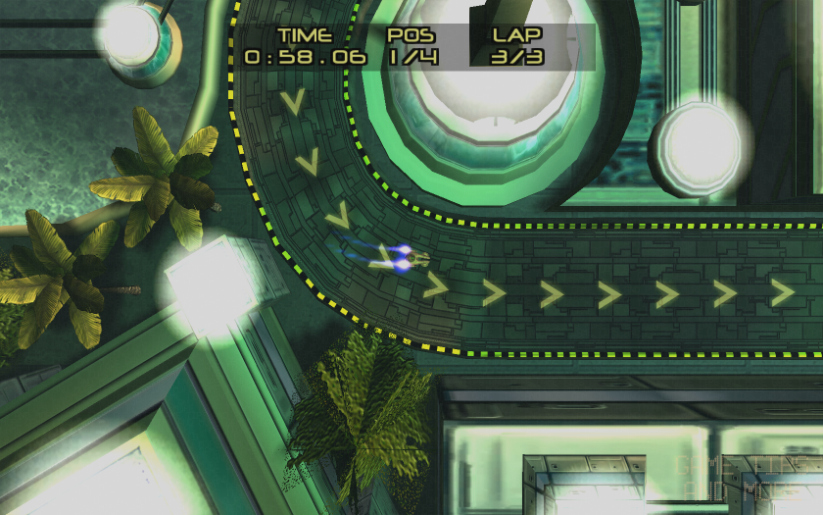
Future Street Race 2165 arcade game. You only need to come in first place all 3 times!
In the adult versions of the other games (adult as in, being an older character in the game) playing videogames, billiards, darts and other such activities are Mini-Games that you can play in the settings Rockstar creates. Playing arcade games is still present and are nice little challenges, but the main mini-game aspect (so far in my gameplay) is the classes you must take. Pushing the right buttons in the right order for Chem class and drawing out an image a'la Qix for Art Class are examples of great interpretations of mini-games, are found in Bully, and are enjoyable reminders of the performance-based time spent in school days of yore [yikes, aging myself here hah].
Biology Class Tray or Cafeteria Tray?
One aspect I must quickly touch on before ending this post is regarding the music. In game, it is present constantly (not particularly a bad thing) and it is pretty catchy. Almost too catchy. I found myself remembering and imitating the music while I wasn't playing. I began to wonder why it was so darned memorable and analyzed it until I figured out why: it is memorable because it is so reminiscent of music of the past.
This is not a dig against Shawn Lee, I'm not saying he was plagaristic, or even derivative here. Perhaps tracks like Beach Rumble sounding like the Miami Vice Theme by Jan Hammer and the track Punishment sounding like Wrapped Around Your Finger by The Police are done in homage. It does seem fitting to utilize their themes for those specific settings in the game anyway. Either way, the music is enjoyable and seemed to fit in with the game well, such as sneaking around done to music that feels like 70's-era Detective Show background track.
And so, it is with this enjoyable game that I am starting a series for this blog I have entitled "Let's Play Without Talking"...
I came up with the idea of making these series of videos (each game will have it's own series/playlist of recordings) because I wanted a way to chronicle the gameplay and enjoyment of games I have - initially for myself to watch again sometime - but I thought that other people might enjoy watching them (especially if YouTube is any indication of such a thing). There seems to be a ton of Videogame Gameplay videos on YouTube today (as opposed to say, over a decade ago) but none have people just being quiet and playing.
These videos are technically not Tutorials or How To's, as I am not showing you what to do to complete the areas (heck I make mistakes in them, as it is generally my first time playing them (so you are literally watching my first time or at least my first time playing that game in a long time (a section of something may be re-recorded if there are technical problems)) and they are definitely not Speedruns or Time Attacks, as I am not trying to complete the game as fast as possible (I like to explore things but am not an Easter-Egg-Hunter either) - I am merely playing the game - and you can watch if you want.
Perhaps watch these while eating a meal or relaxing before bed, reminiscing of the game and the enjoyment you perhaps had with it in the past. It's like you have come over to my house (I made a couple dozen chicken wings for us) and you are literally Watching Me Play while you eat or something - and I don't talk while I play... [Technically, these could be classified as Walkthroughs, as I am showing you how to possibly do things, but as it is my first time playing the game, it is not in the most efficient way possible.. I make mistakes, some stupid, some funny.. and what is shown is only one path to take, one possibility and it is definitely not the absolute full experience of the game. I understand the helpfulness and entertainment value of commentating on videos, but originally searching on YouTube I did not find many game recordings where people would just shut up and play and let me watch the game and enjoy it that way, haha. Today, there are an increasing number of 'Let's Play' videos of just gameplay, and so I feel it is alright to share my experience of the game in the spirit of entertainment of others and not intentional copyright infringement (these types of videos will never be 'monetized' - it is even free advertising for the game and game companies - if you like the game material, buy their games and support them!) Remember fondly, or purchase to enjoy, these great games!]
To celebrate, I present this Desktop Background Wallpaper, adapted from an original Rockstar Bully Scholarship Edition Wallpaper, edited and retiled for Widescreen Monitors:
A nice and neat pattern-style desktop background wallpaper, just for you from Game Tips And More!
Bully desktop wallpaper by Rockstar
Now, without further ado...
The Game Tips And More Blog presents:
Let's Play Without Talking (Walkthrough) Bully: Scholarship Edition - Part I (HD)
Enjoy!
Disclaimer: This gameplay recording is intended for Educational and/or Entertainment purposes only and is possibly subject to Fair Use. It is meant as instructional (a "walkthrough") and entertainment (a "playthrough" or "Let's Play") showing only one possible example of one possible path of gameplay and it's exact likeness as a game path (movements, actions, etc) is not repeatable (with 100.000% accuracy) therefore your game experience will be different. This video is not a representation of the full experience of the game as a player (esp. as it is usually the first time playing the game, mistakes included). This category of videos will never be "monetized" by us. Any possible copyright of any material within the video, if present, will be respected and requires notice of possible approach of infringement of the representative companies. Removal or Censorship of the possibly-infringing material will be undertaken. No actual infringement is intended and cannot be inferred. In fact, this is a form of free advertising for any companies involved: if you like their product as a result of seeing this, go out and buy it and support them! Create your own experience of the gameplay material! Have fun! This video is not intended to be a substitute for medical advice.